RC Battery Strategy: The 1-Battery Rule

RC Battery Strategy: The 1-Battery Rule

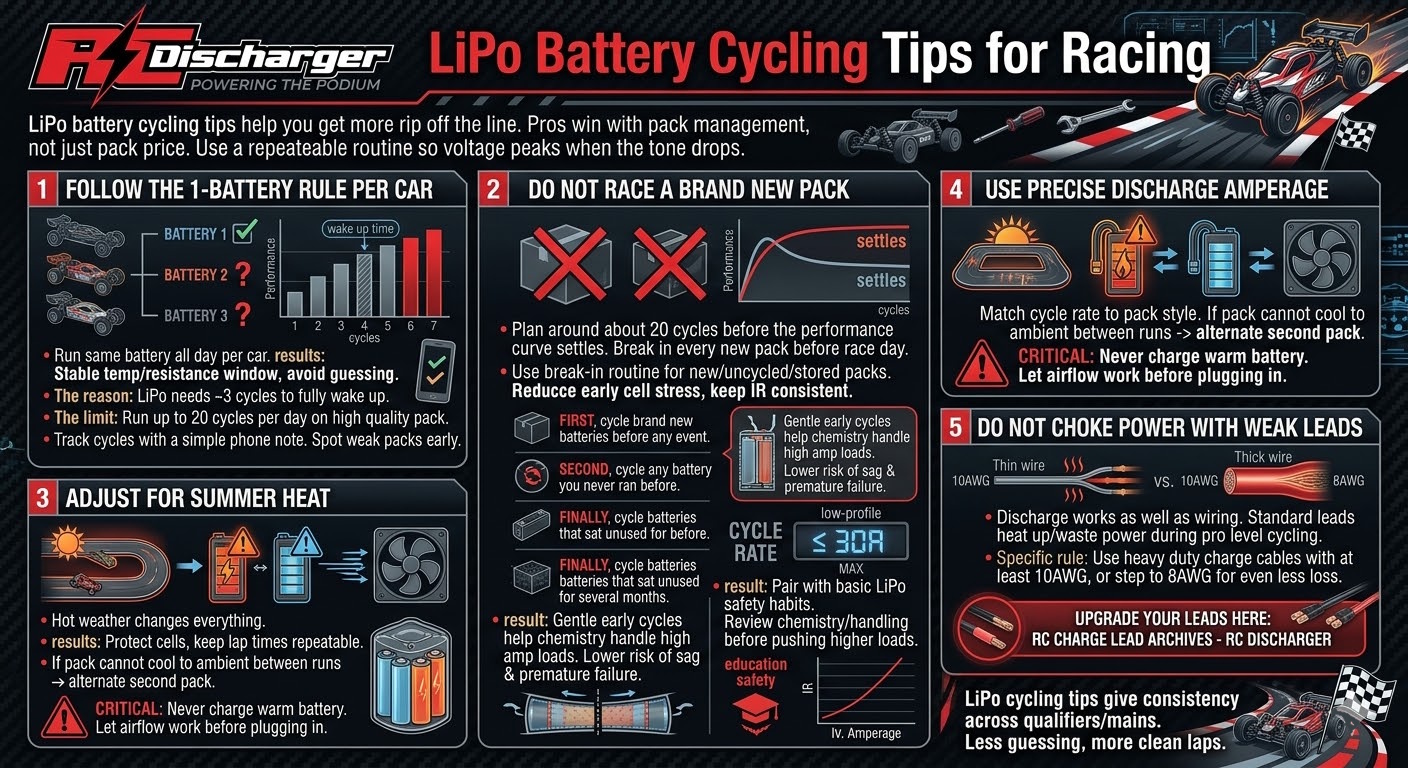
Do you want to know how the pros get that extra “rip” off the line? It’s not just about the battery you buy—it’s about how you manage it throughout the day. At RC Discharger, we recommend a specific cycling protocol to ensure your packs are hitting their peak voltage when the tone drops.

The “One Battery” Rule

For maximum performance, we recommend using the same battery all day per car.

  • The Reason: A LiPo battery typically needs 3 cycles to fully “wake up” and reach its optimum internal temperature and resistance levels.
  • The Limit: You can safely run up to 20 cycles per day on a single high-quality pack.

Never Race a Brand New Battery

Think a fresh-out-of-the-box battery is your fastest? Think again. A LiPo battery actually needs 20 cycles before it settles into its peak performance curve.

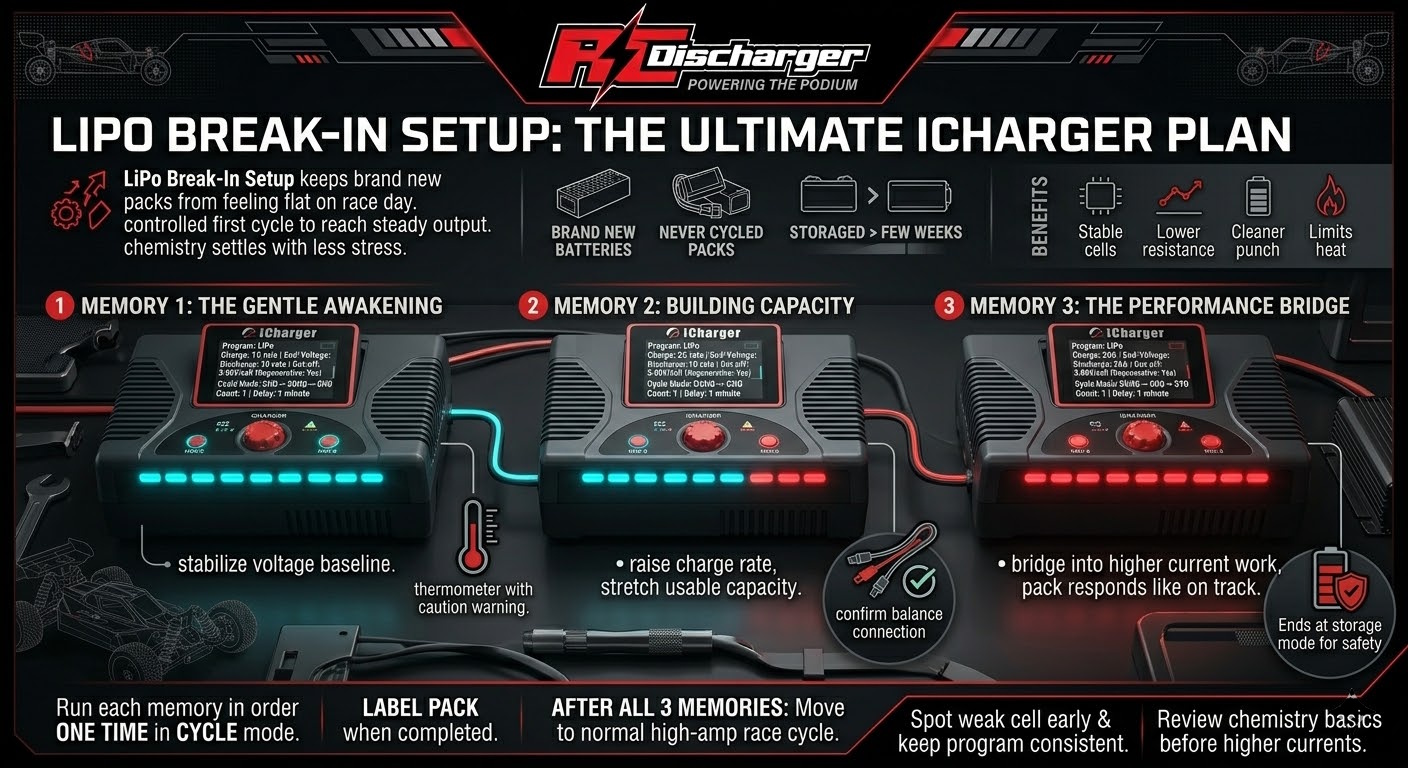
Pro-Tip: Never use a brand new battery for the first time in a race. Follow our Break-In Procedure for:

  1. Brand new batteries.
  2. Batteries you have never cycled.
  3. Batteries that have been sitting unused for a few months.

This prepares the chemistry to handle high-amp loads safely and ensures you don’t “shock” the cells into early failure.

Beat the Heat: Summer Adjustments

While one battery is ideal, your environment matters. If it’s a scorching summer day and your battery isn’t cooling down to ambient temperature between runs, alternate with a second pack.

CRITICAL: Never charge a battery that is still warm to the touch. Safety first!

Precision Amperage

To protect the longevity of your cells while still getting maximum power:

  • Low Profile Batteries: We recommend a maximum cycle rate of 30A. This is the “sweet spot” for punch without over-stressing the thinner cells.

Don’t Choke Your Power

Your discharge is only as good as the wire it travels through. Standard leads can’t handle the heat of professional cycling. We recommend using our heavy-duty charge cables, designed with a minimum of 10AWG or 8AWG wire to ensure zero power loss.

Upgrade your leads here: RC Charge Lead Archives – RC Discharger

iCharger DUO Resistor Bank Setup | 40A Discharge Guide

iCharger DUO Resistor Bank Setup | 40A Discharge Guide

Ready to see what your batteries can really do? Setting up your RC Discharger Resistor Bank correctly is the key to achieving those high-amp discharges that give you the “punch” you need on the track.

Follow this precision guide to configure your iCharger DUO (308DUO, 406DUO, 4010DUO, DX6, DX8, DX12, 456DUO, 458DUO and 4512DUO) for maximum performance.

Step-by-Step Configuration:

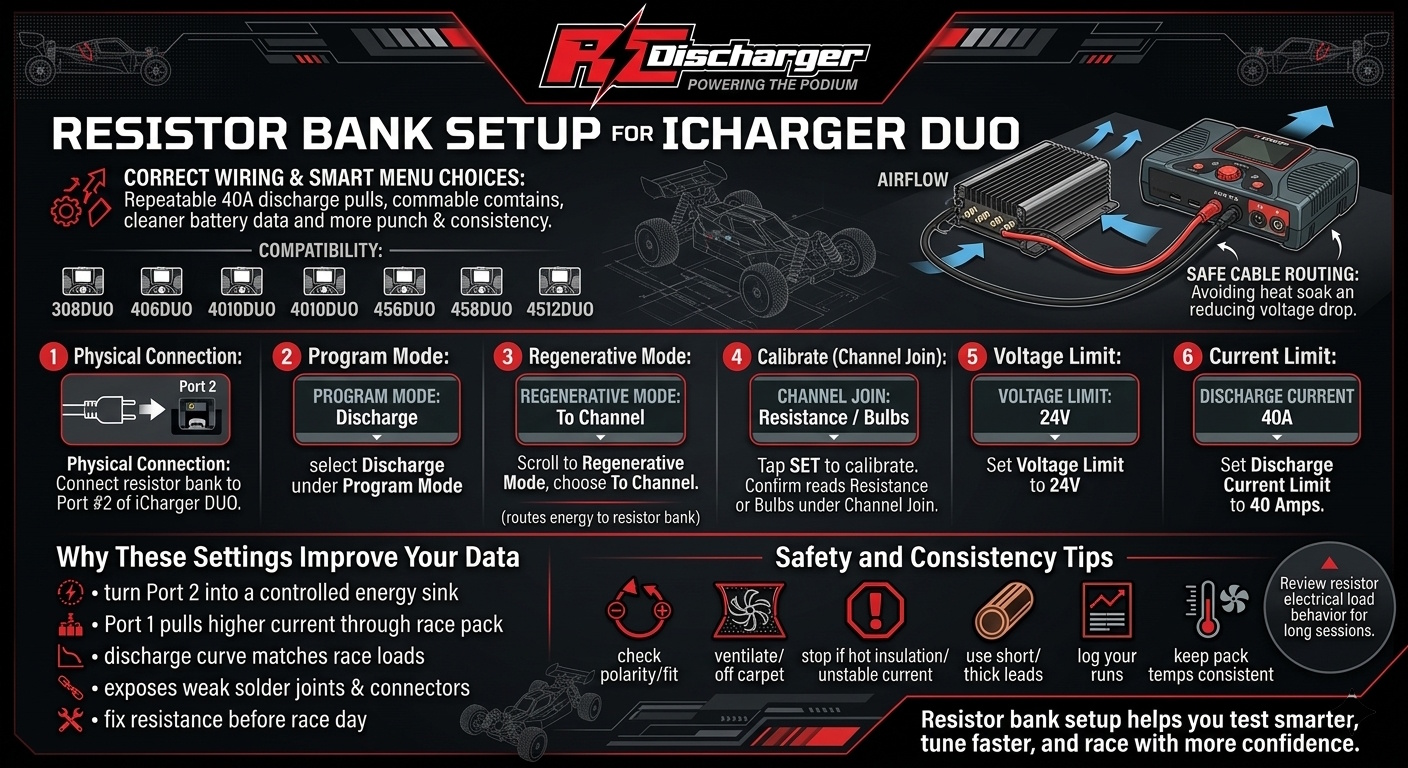
  1. Physical Connection: Connect your battery discharger (resistor bank) to Port #2 of your iCharger DUO.
  2. Program Mode: Navigate to the menu and select Discharge under the Program Mode settings.
  3. Regenerative Mode: Scroll to the Regenerative Mode option and select To Channel. This tells the charger to dump the energy into the resistor bank on the other port.
  4. Calibrate (Channel Join): Tap the SET button to calibrate. Under the Channel Join setting, ensure the iCharger reads “Resistance or Bulbs”.
  5. Voltage Limit: Set your Voltage Limit to 24V.
  6. Current Limit: Set your Discharge Current Limit to 40 Amps.

Why the Settings Matter

By setting the charger to “To Channel” mode, you are essentially turning Port 2 into a massive energy sink. This allows you to pull high current (up to 40A) through your race packs on Port 1, simulating real-world race conditions and lowering internal resistance for maximum power.

Pro-Tip: Always double-check your connections before hitting “Start.” A solid connection ensures accurate IR readings and consistent discharge curves!

How to Update iCharger via SD Card | No Windows Required

How to Update iCharger via SD Card | No Windows Required

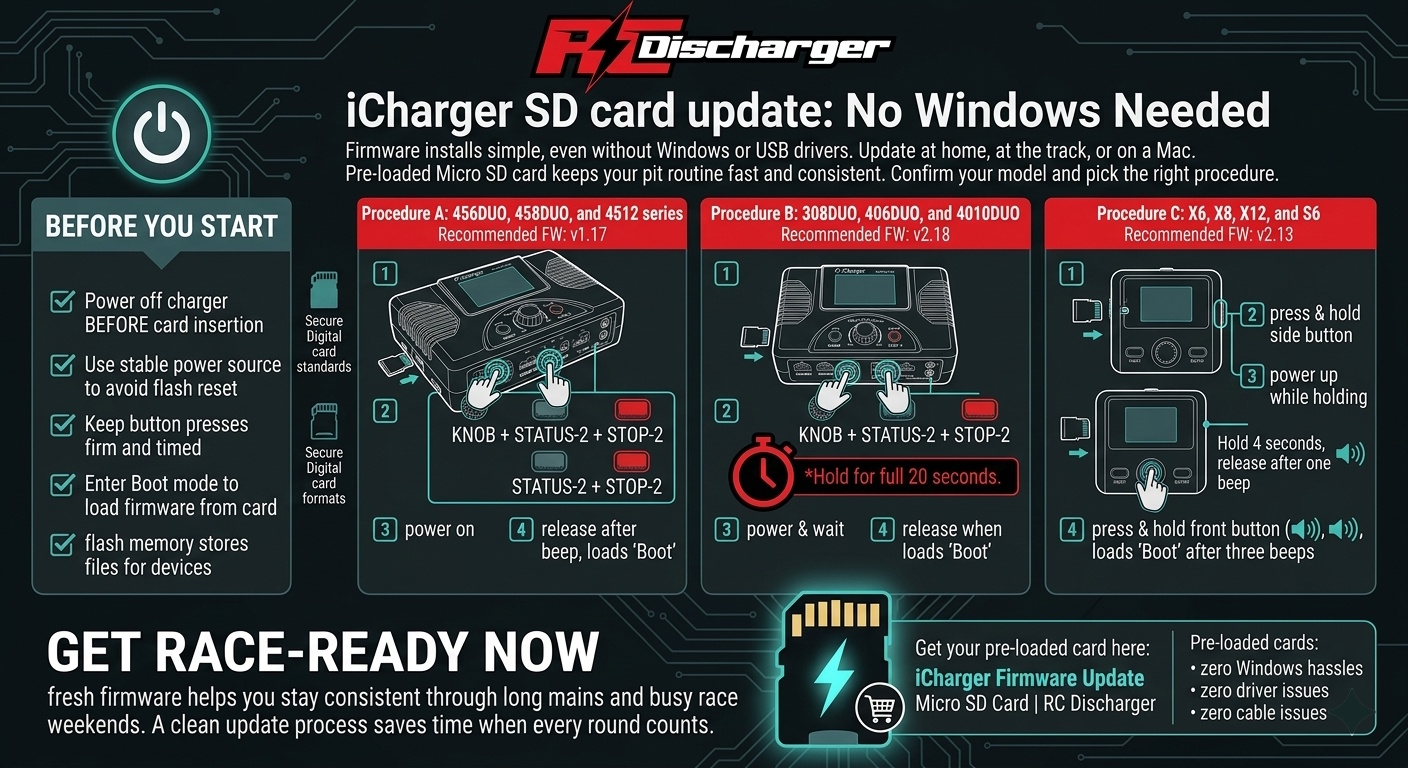
Tired of fighting with Windows drivers or USB cables? At RC Discharger, we’ve made updating your iCharger plug-and-play. Whether you’re a Mac user or at the track without a laptop, our pre-loaded Micro SD card has you covered.

Depending on which iCharger you use, there are two distinct procedures to ensure a successful flash. Follow the steps for your specific model below:

Procedure A: For 308DUO, 406DUO, and 4010DUO

Recommended Firmware: v2.18

  1. Insert: Plug the RC Discharger Micro SD Card into your charger’s slot.

  2. The Combo: Press and hold these three buttons: KNOB + STATUS-2 + STOP-2.

  3. Power & Wait: While holding the buttons, power on your charger. Continue holding all three buttons for a full 20 seconds.

  4. Release: Once 20 seconds have passed and you see “Boot” on the screen, release the buttons.

Procedure B: For DX6, DX8, DX12, X6, X8, X12, S6, and 45x Series

Recommended Firmware: v2.13 (X/S Series) | v1.17 (DX/45x Series)

  1. Insert: Plug the RC Discharger Micro SD Card into your charger’s slot.

  2. The Combo: Press and hold these three buttons: KNOB + STATUS-2 + STOP-2.

  3. Power Up: While holding the buttons, power on your charger.

  4. Release: As soon as the screen changes and you see “Boot”, release the buttons immediately.

Get Race-Ready Now

Your charger is now flashed and ready for the main event—no drivers, no cables, and zero Windows required. Keep your pit setup on the cutting edge for maximum performance.

Get your pre-loaded card here: iCharger Firmware Update Micro SD Card | RC Discharger

Professional LiPo Safety Guide | Prevent RC Battery Fires

Professional LiPo Safety Guide | Prevent RC Battery Fires

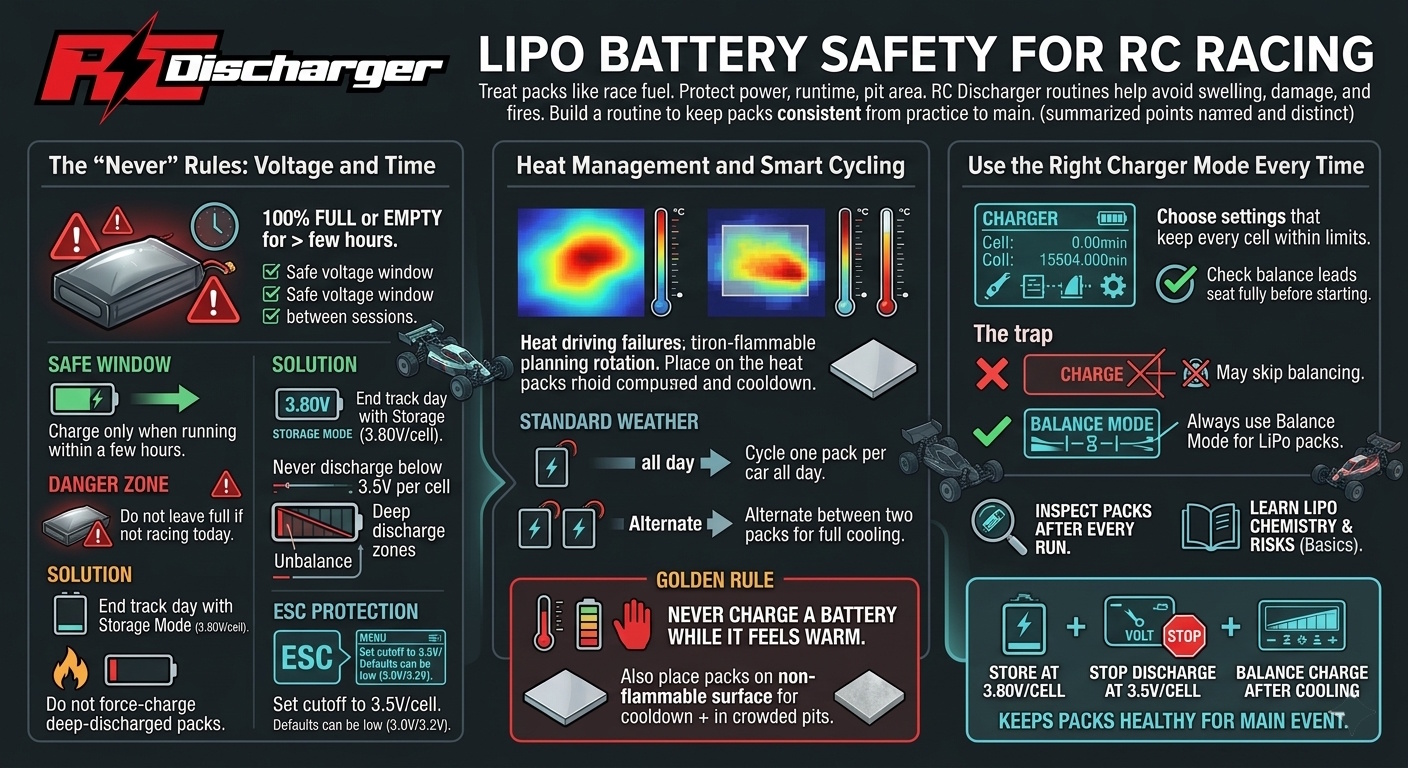
LiPo batteries are the lifeblood of RC racing, delivering the massive “punch” we need for the podium. But they are volatile. Mistreating them doesn’t just kill your performance—it creates a serious fire hazard.

At RC Discharger, we want you to stay fast AND safe. Follow these non-negotiable rules to protect your equipment and your home.

The “Never” Rules: Voltage & Time

  1. Never leave a battery 100% full or “empty” for more than a few hours.

    • The Safe Window: It’s okay to have a pack charged if you’re running it within a few hours.
    • The Danger Zone: If you aren’t racing today, don’t leave it full. A full LiPo is chemically unstable; leaving it creates swelling (puffing) and a high fire risk.
    • The Solution: Always end your track day by putting every battery into Storage Mode (~3.80V per cell).
  1. Never discharge below 3.5V per cell.

    • Dropping into the “death zone” (below 3.0V) permanently damages the chemistry.
    • Fire Risk: If you force-charge a battery that was drained too low, it is highly likely to ignite.

CRITICAL: Dial in Your ESC Settings

Don’t guess when to pull off the track. Let your electronics protect your investment.

  • Set your Low Voltage Cutoff (LVC): Enter your ESC program settings.
  • The Target: Set the cutoff to 3.5V per cell.
  • The Warning: Many factory defaults are set to 3.0V or 3.2V. By the time the car stops at those levels, the battery is often already overheating. Set it to 3.5V to stay in the safe zone.

Heat Management & Cycling

Heat is the ultimate enemy of safety. How you manage your packs depends on the pits:

  • Standard Weather: You can generally cycle a single battery all day per car.
  • Hot Weather: If the ambient temp is high, batteries can’t dissipate heat fast enough. Alternate between two packs.
  • The Golden Rule: NEVER charge a battery while it is warm to the touch. Let it cool to ambient temperature first to prevent thermal runaway.

Charger Warning: Use the Right Mode

Using the wrong setting is a leading cause of pit fires.

  • The Trap: On many chargers, “Charge” mode does not balance the cells. If one cell fills faster than the others, it will overcharge and ignite.
  • The Fix: ALWAYS use “Balance Mode.” This ensures every cell is equalized and stays at a safe voltage.

Stay safe, respect the chemistry, and keep your packs healthy for the main event!

RC Wire Gauge Guide | Why 10AWG is Better Than 12AWG

RC Wire Gauge Guide | Why 10AWG is Better Than 12AWG

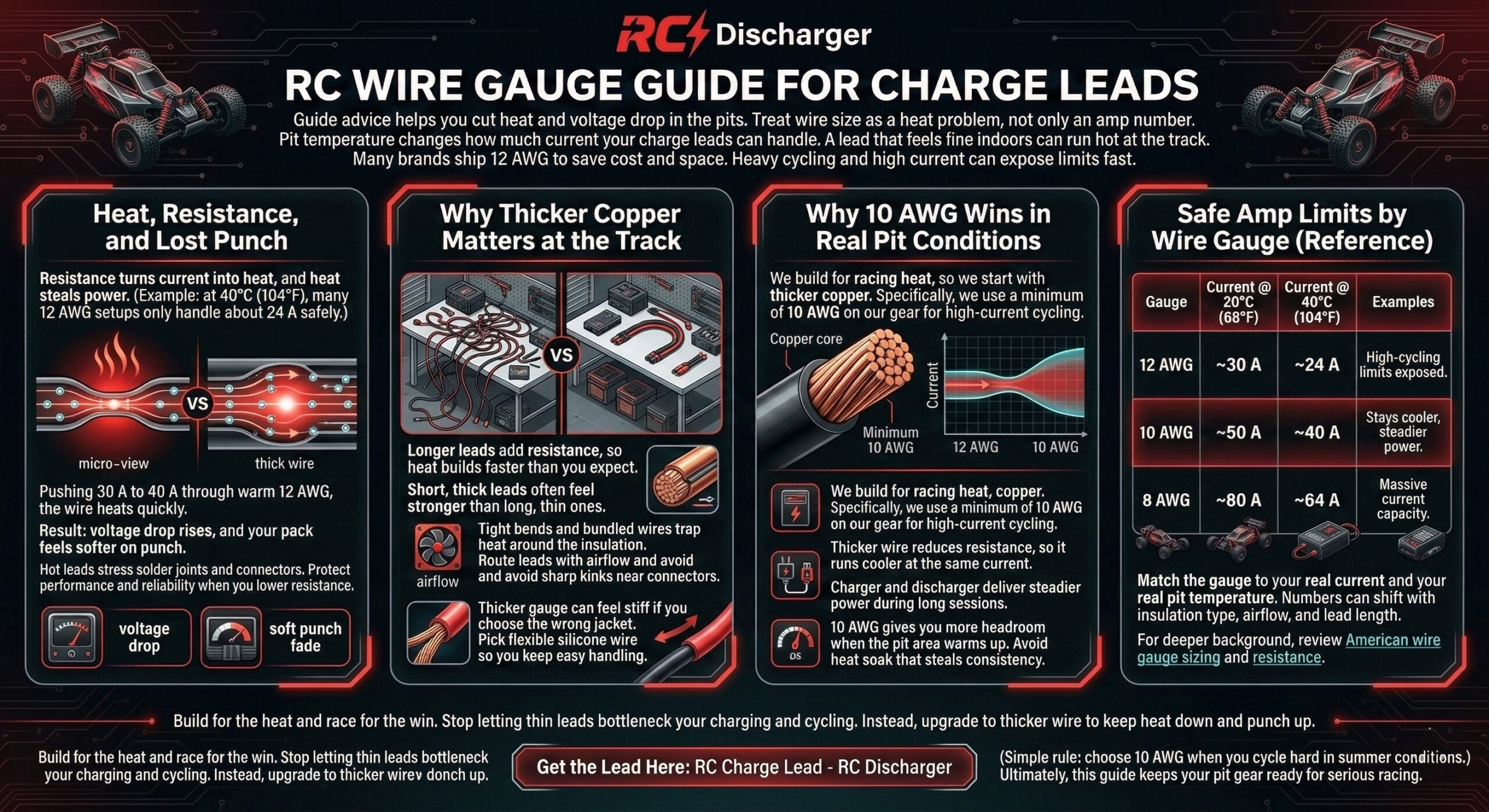
Did you know that ambient temperature drastically changes how much power your charge leads can actually handle? It’s not just about the amps—it’s about the heat.

Most brands don’t design their charge leads for the extreme stress of heavy cycling. Many stay stuck at 12AWG, but when you look at the physics of high-performance racing, the math simply doesn’t add up.

The Heat Reality Check

Resistance creates heat, and heat kills performance. At an ambient temperature of 40°C (104°F)—which is common in many summer pits—a standard 12AWG wire is only rated for roughly 24 Amps.

If you push 30A or 40A through that wire in the heat, you aren’t just risking a failure; you are generating excess resistance that chokes your battery’s punch.

The RC Discharger Standard

We don’t settle for “standard.” This is exactly why we use a minimum of 10AWG on our gear. We build our products to handle the blistering heat of the track and the high-current stress of professional cycling protocols.

Safe Amp Limits by Wire Gauge

Don’t let your leads be the bottleneck in your racing program:

Wire Gauge Safe Limit at 20°C (68°F) Safe Limit at 40°C (104°F)
12 AWG ~30 Amps ~24 Amps
10 AWG ~50 Amps ~40 Amps
8 AWG ~80 Amps ~64 Amps

Build for the Heat. Race for the Win.

Stop losing power to thin wires and heat soak. Upgrade your pit game with the heavy-duty standards used by the pros.

Get the Sensor Here: RC Charge Lead – RC Discharger

LiPo Battery Safety Protocol | Safe High-Amp Cycling Guide

LiPo Battery Safety Protocol | Safe High-Amp Cycling Guide

We all want maximum punch off the line, but pushing your batteries too hard without the right data is a recipe for disaster. At RC Discharger, we believe in performance backed by precision.

Follow these professional safety protocols to ensure your packs stay fast, healthy, and—most importantly—safe all season long.

The Pro Cycling Protocol

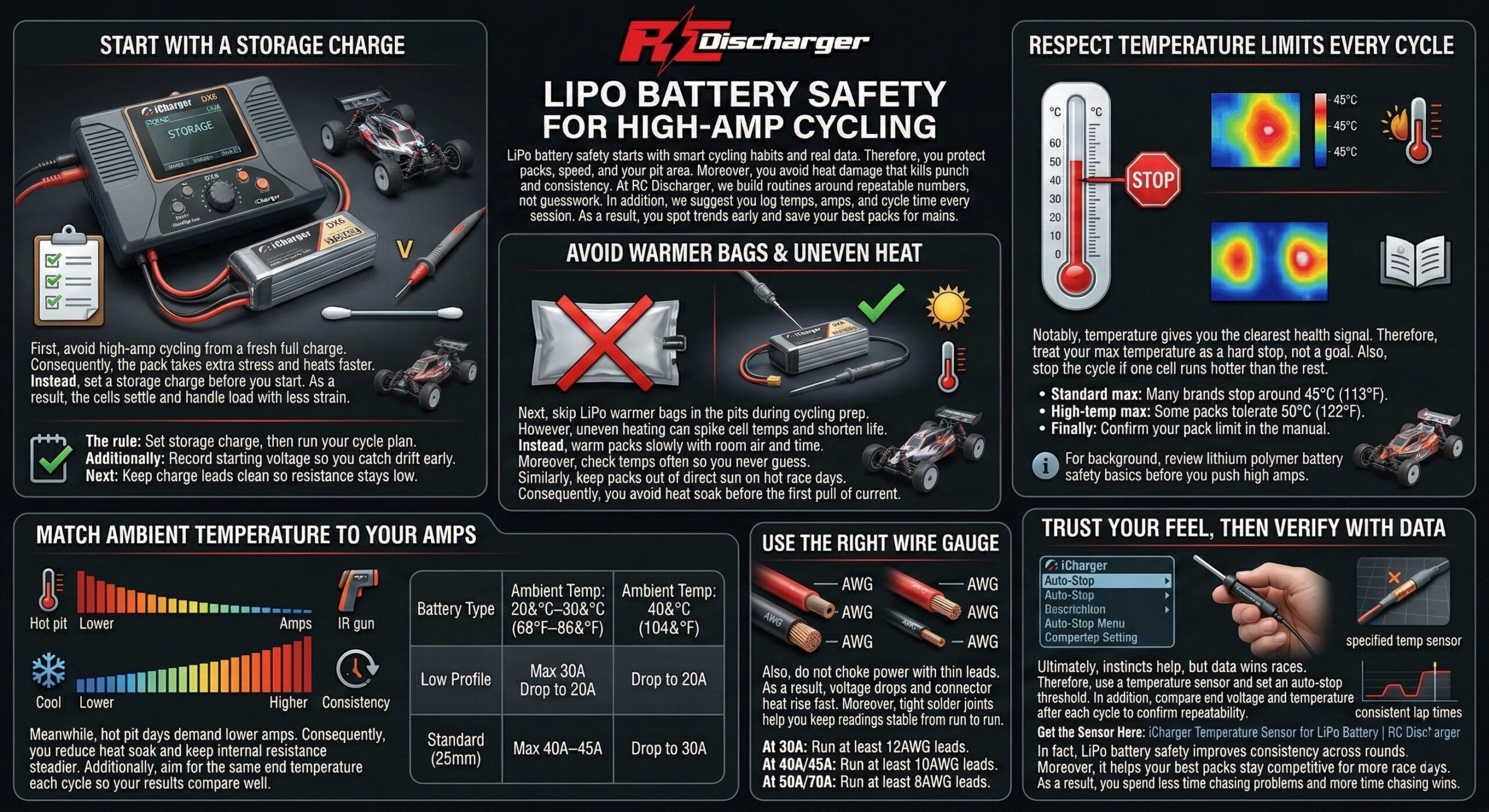
Never cycle a fully charged battery. Starting a high-amp cycle on a full pack puts extreme stress on the internal chemistry.

  • The Rule: Always run a Storage charge first. This stabilizes the cells and prepares them for the high-load cycling process.

STOP Using LiPo Warmer Bags

Warmer bags can be “battery killers.” They often create uneven heat and can easily overheat your cells, destroying them before you even reach the drivers’ stand.

CRITICAL: Respect the Heat

Temperature is the ultimate indicator of battery health.

  • Standard Max: Most brands cap out at 45°C (113°F).
  • High-Temp Max: Some specialized brands can handle up to 50°C (122°F).
  • Always check your battery’s user guide to know its specific limit.

Ambient Temp vs. Max Amps

The hotter the pits, the lower your amps should be. Don’t cook your gear!

Battery Type Ambient Temp: 20°C–30°C (68°F–86°F) Ambient Temp: 40°C (104°F)
Low Profile Max 30A Drop to 20A
Standard (25mm) Max 40A–45A Drop to 30A

Wiring: Don’t Choke Your Power

Using thin leads causes voltage drops and dangerous heat.

  • At 30A: Minimum 12AWG lead.
  • At 40A/45A: Minimum 10AWG lead.
  • At 50A/70A: Minimum 8AWG lead.

Trust Your Gut, But Use the Data

Your instincts are great, but precision wins races. Protect your investment with our dedicated temperature sensor to auto-stop your cycle if things get too hot.

Get the Sensor Here: iCharger Temperature Sensor for LiPo Battery | RC Discharger

How to Get Accurate RC Battery IR Readings

How to Get Accurate RC Battery IR Readings

Tired of seeing Internal Resistance (IR) numbers jump all over the place? Accurate IR is the secret to knowing exactly how much “punch” your battery has left. If your readings aren’t consistent, you’re just guessing.

At RC Discharger, we want you to have the most precise data possible. Here is how you dial in your setup for professional-grade consistency.

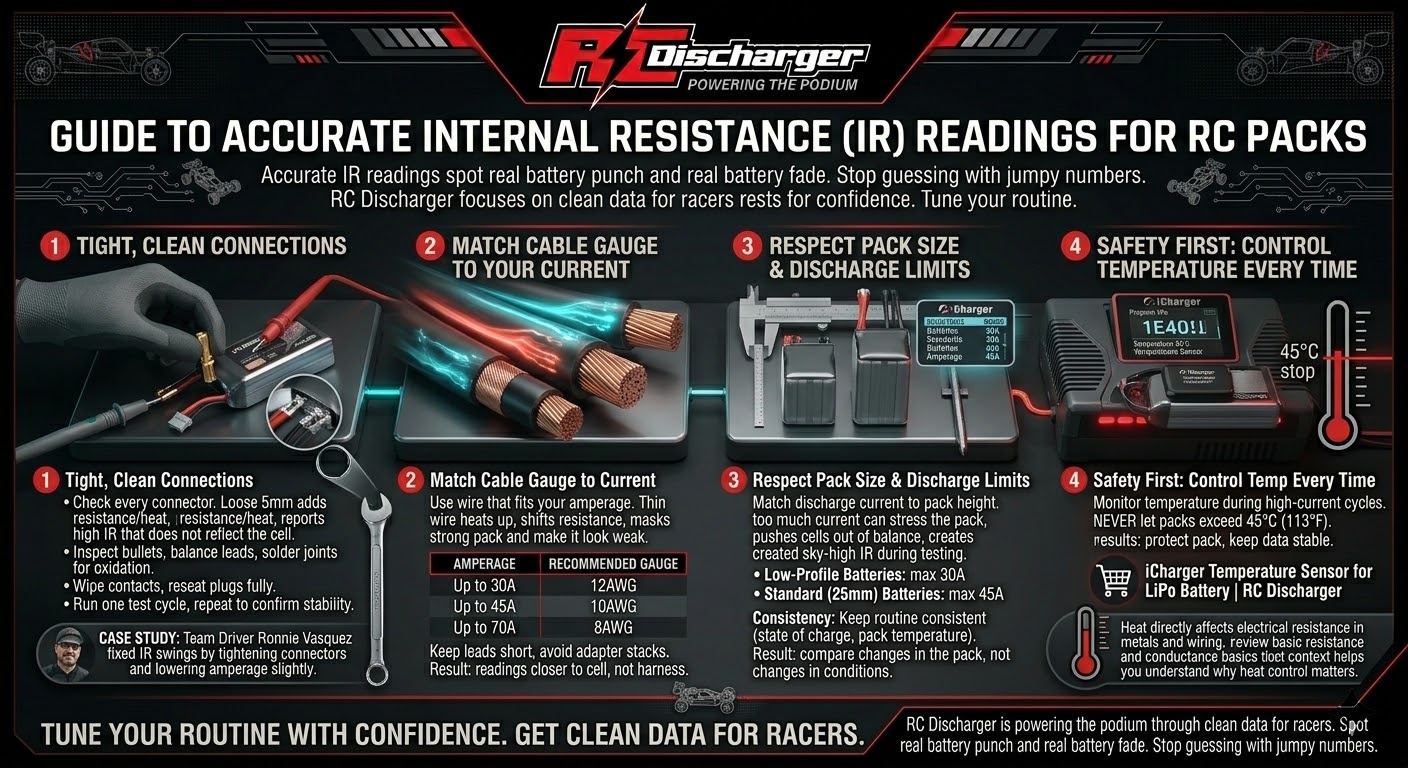
1. Check Your Connections!

The #1 cause of inconsistent IR is a weak physical connection. A loose 5mm bullet on your charge cable is a resistance killer.

Pro Success Story: Team driver Ronnie Vasquez solved his IR fluctuations by simply tightening his connectors and slightly lowering his amperage. It’s the small details that win races!

2. Use the Right Cable Gauge

Heat is the enemy of accuracy. Pushing high current through thin wire is dangerous and yields bad data. Follow these minimums:

  • Up to 30A: Use at least 12AWG cable.
  • Up to 45A: Use at least 10AWG cable.
  • Up to 70A: Use at least 8AWG cable.

3. Respect Your Battery Size

Over-cycling a battery with too much amperage will cause cell imbalance and sky-high IR readings. Match your discharge to your pack height:

  • Low-Profile Batteries: Max 30A.
  • Standard (25mm) Batteries: Max 45A.

Safety First: Monitor Your Temps

To protect your investment and ensure accuracy, never let your packs exceed 45°C (113°F). We highly recommend using our dedicated temperature sensor to auto-monitor your battery during high-current cycles.

Grab your sensor here: iCharger Temperature Sensor for LiPo Battery | RC Discharger

iCharger & ToolkitRC Recommended Firmware Guide

iCharger & ToolkitRC Recommended Firmware Guide

Hey RC Discharger family! Before you plug in and start cycling your packs, there is one small but critical step to ensure your setup is dialed in for the podium.

To get the most out of your Regenerative Discharger and avoid any technical glitches, your charger needs to be running the right software. Taking 30 seconds to verify your firmware version now ensures everything works in perfect harmony when you’re in the pits!

Quick Check: How to find your version

You don’t even have to dig through menus! Just watch your charger screen the moment you power it up—the firmware version will flash on the display for a few seconds during the boot sequence.

Recommended Firmware Versions

To ensure seamless performance, we recommend the following versions:

  • v2.18 for: iCharger 308DUO, 406DUO, 4010DUO
  • v2.13 for: iCharger S6, X6, X8, X12
  • v1.17 for: iCharger DX6, DX8, DX12, 456DUO, 458DUO, 4512DUO
  • v3.11 for: ToolkitRC M8D

No Windows Computer? No Problem!

Updating an iCharger usually requires a Windows PC, which can be a hassle if you’re a Mac user or at the track without a laptop. We have the solution:

The iCharger Firmware Update Micro SD Card. We can ship you a pre-loaded Micro SD card with the latest firmware so you can update your charger directly—no computer required!

Get the SD Card or download the files here: iCharger Firmware Update Micro SD Card | RC Discharger

Keep your gear updated, your discharge rates precise, and your packs ready for the main event!

iCharger Firmware Update Guide | The Stability Rule

iCharger Firmware Update Guide | The Stability Rule

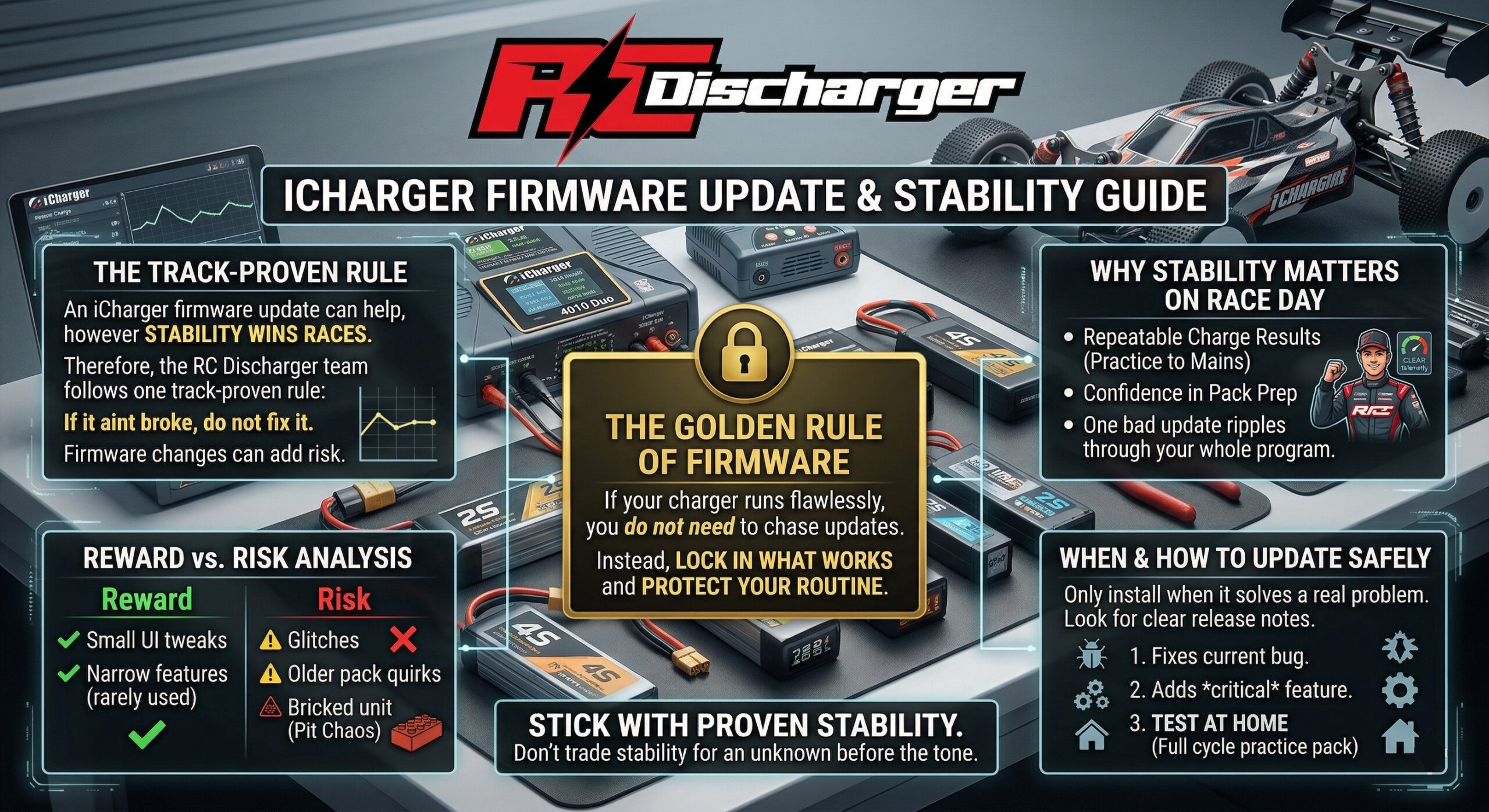
In the high-stakes world of competitive RC racing, reliability is your most valuable asset. A quick word of advice from the RC Discharger team regarding your iCharger (and all your essential pit electronics): If it ain’t broke, don’t fix it!

While it’s tempting to always have the “latest and greatest,” firmware updates in the RC world can be a double-edged sword.

The “Golden Rule” of Firmware

If your charger is running flawlessly and meeting every one of your needs on race day, don’t feel pressured to upgrade.

  • The Reward: Often just minor UI tweaks or niche features you might never use.
  • The Risk: Unforeseen glitches, compatibility issues with older packs, or the nightmare scenario—bricking your unit in the middle of a big event.

Our Professional Recommendation

Only pull the trigger on an update if:

  1. It explicitly resolves a technical bug you are currently experiencing.
  2. It introduces a critical feature that is essential for your specific racing program.

Stick with the Stability You Have

When you’re at the track, you need to know your gear will perform exactly as it did yesterday. Don’t trade a proven, stable setup for an unknown variable right before the tone drops.

What’s your take? Have you ever had a firmware update save the day, or did it leave you stranded in the pits? Drop your experiences in the comments!

How to Enable iCharger USB Port | Power Delivery Hack

How to Enable iCharger USB Port | Power Delivery Hack

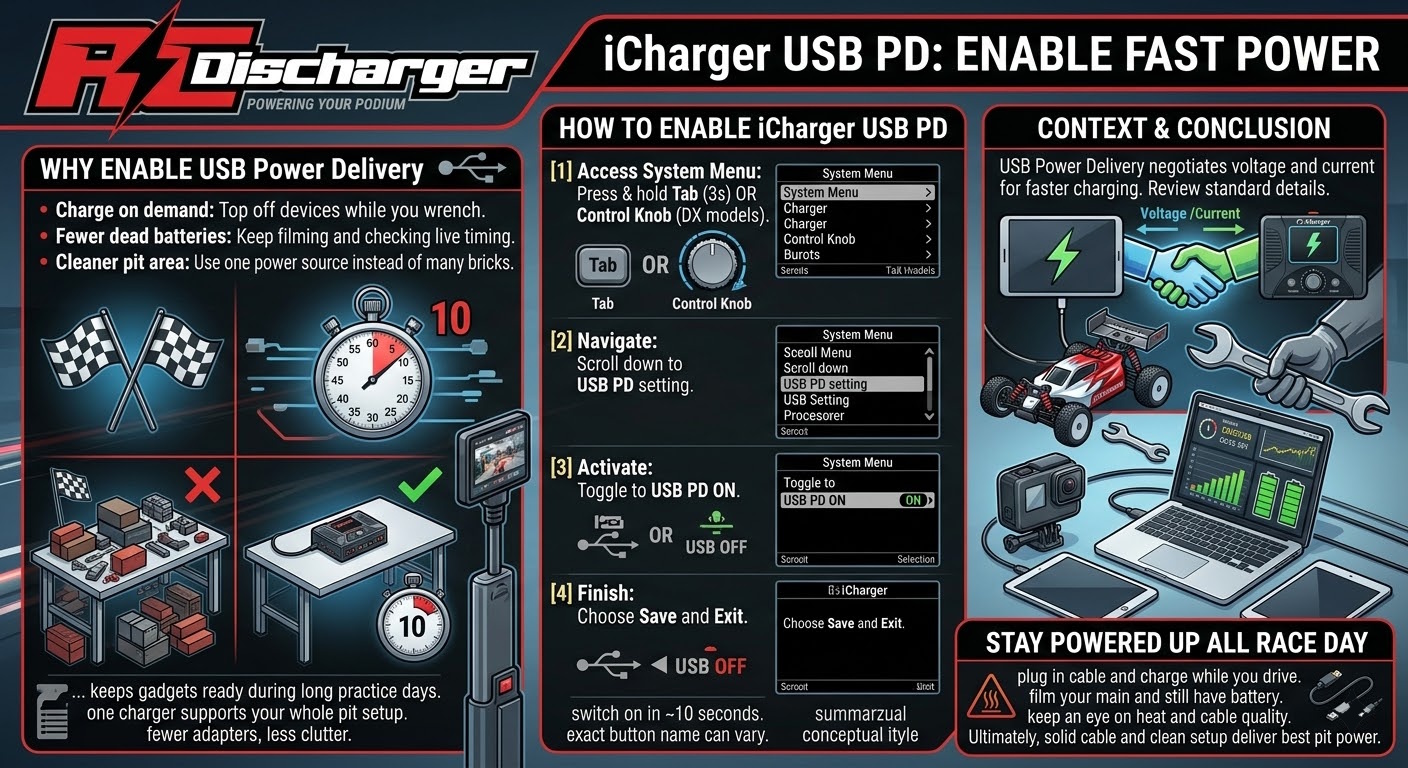
Did you know your iCharger is hiding a secret feature? It can double as a high-speed power bank for your phone, tablet, or GoPro right at the track!

By default, the USB port is disabled to prioritize charging logic, but you can unlock this “Power Delivery” mode in under 10 seconds. Stop hunting for wall outlets in the pits and put your charger to work!

How to Enable Power Delivery:

  • Access System Menu: Press and hold the Tab button (or the Control Knob on DX6/DX8/DX12 models) for 3 seconds.
  • Navigate: Scroll down until you find the “USB PD” setting.
  • Activate: Toggle the setting to “USB PD ON”.
  • Finish: Make sure to Save and Exit to lock in the change!

Stay Powered Up All Race Day

Now you can keep your devices topped off while you’re out on the drivers’ stand. Whether you’re filming your main or checking live timing, you’ll never have to worry about a dead battery again.

1/28 Scale LiPo Cycling Guide | Peak Power & Consistency

1/28 Scale LiPo Cycling Guide | Peak Power & Consistency

Huge thanks to the global community of drivers who have trusted our cycling procedures to rack up track records, TQs, and podium wins. To help everyone achieve that same edge, we’re breaking down the precise steps to get the absolute best out of your micro batteries.

The secret to peak power and consistency isn’t just a high-end charger—it’s about preparing the chemistry and meticulous temperature management.

The Essential Gear

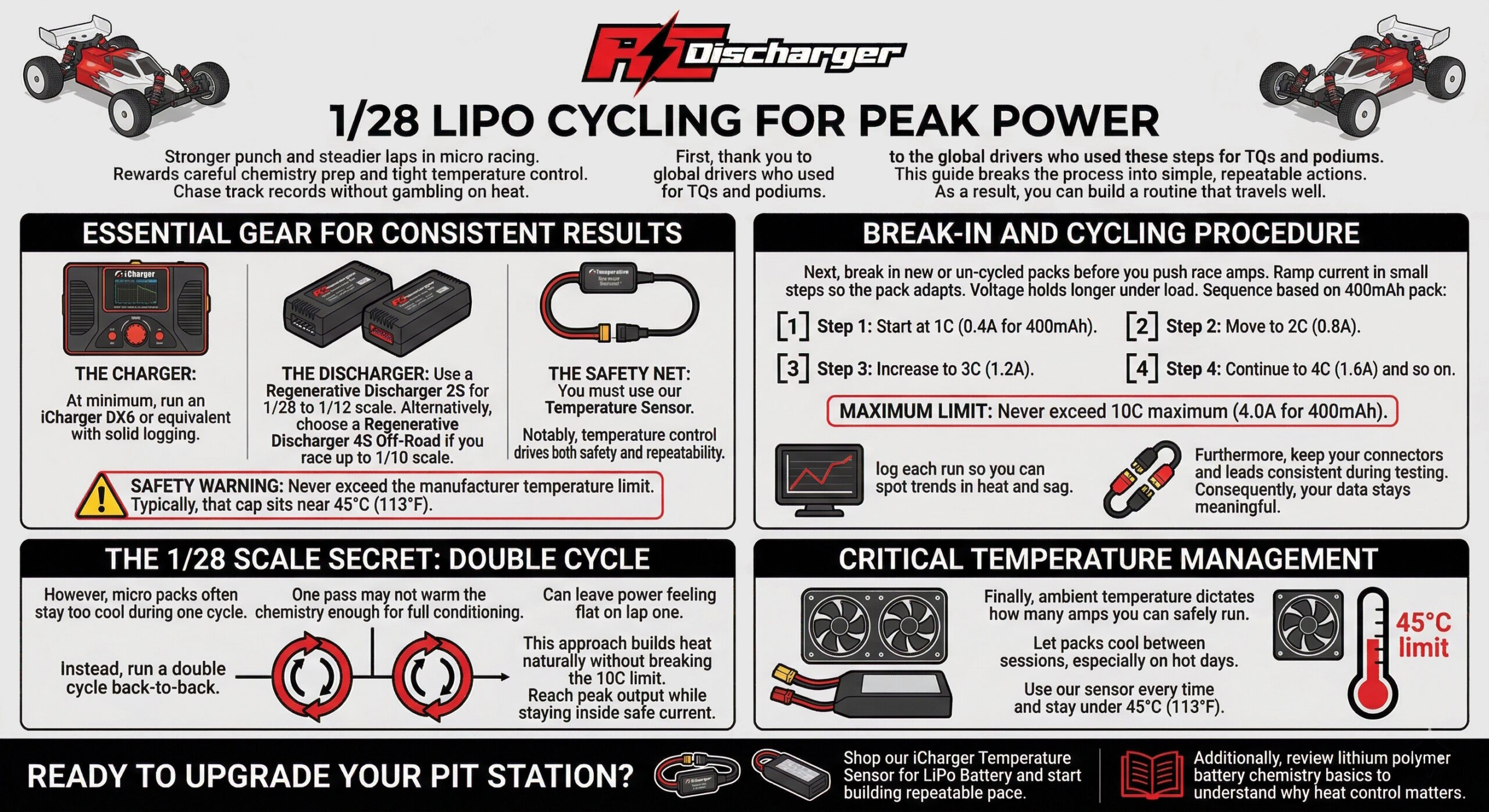
Before you begin, ensure you have the right tools for a professional-grade setup:

  • The Charger: At minimum, an iCharger DX6.
  • The Discharger: A Regenerative Discharger 2S (ideal for 1/28 to 1/12 scale) or the Regenerative Discharger 4S Off-Road (for those racing up to 1/10 scale).
  • The Safety Net: You must use our Temperature Sensor. Keeping the battery within safe limits is non-negotiable for performance and safety.

Safety Warning: Never exceed the manufacturer’s recommended temperature—most often 45°C (113°F).

The Break-In & Cycling Procedure

Initial break-in is critical to prepare the battery chemistry to safely handle high-amp racing and cycling. For a new or un-cycled battery, follow this gradual increasing sequence based on the battery capacity:

  • Step 1: Start at 1C (e.g., 0.4A for a 400mAh pack).
  • Step 2: Gradually increase to 2C (0.8A).
  • Step 3: Move to 3C (1.2A).
  • Step 4: Continue to 4C (1.6A) and so on.
  • Maximum Limit: Never exceed 10C MAXIMUM (e.g., 4.0A for a 400mAh pack).

The 1/28 Scale Secret: The Double Cycle

While the initial break-in is essential, micro batteries often don’t get warm enough to reach optimal internal conditioning with a single cycle.

The professional solution is to perform a DOUBLE CYCLE BACK-TO-BACK. This warms the battery chemistry enough for peak power without requiring you to push past the safe 10C amperage limit.

Critical Temperature Note

Ambient temperature dictates how many amps you can safely run. You must allow batteries to cool down properly between sessions. Always use our Temperature Sensor to ensure you stay under the 45°C (113°F) threshold to protect your investment.

Ready to upgrade your pit station? Shop our iCharger Temperature Sensor for LiPo Battery to start setting your own track records.

RC Discharger