
Test it. Compare it.Know it.
Test two RC LiPo batteries under the same conditions, follow their live curves and automatically archive every result. Choose your platform below, then review the required hardware before purchasing.
Supported iCharger models
These 13 iCharger models are currently supported and validated with RC Discharger Battery Benchmark.
Use app version 0.3.681 or later. The iCharger firmware version listed for each model below is mandatory.
- iCharger 456DUOFirmware 1.19 required
- iCharger 458DUOFirmware 1.19 required
- iCharger 4512DUOFirmware 1.19 required
- iCharger 308DUOFirmware 2.18 required
- iCharger 406DUOFirmware 2.18 required
- iCharger 4010DUOFirmware 2.18 required
- iCharger DX6Firmware 1.19 required
- iCharger DX8Firmware 1.19 required
- iCharger DX12Firmware 1.19 required
- iCharger S6Firmware 2.13 required
- iCharger X6Firmware 2.13 required
- iCharger X8Firmware 2.13 required
- iCharger X12Firmware 2.13 required
We will update this page every time another iCharger is validated and added to RC Discharger Battery Benchmark. Check this list for the latest supported models.
Need the firmware? Download the firmware file for your iCharger and follow the update steps in the RC Discharger FAQ.
Models not listed above have not yet been validated for Benchmark. Install the latest app version before using a newly supported charger.
Key product points
Get to know your LiPo batteries with real test data. Built exclusively for RC Discharger Regenerative Dischargers, Benchmark brings battery testing, archiving, comparisons, cycling and break-in programs into one app for Windows, Android, iPhone and iPad.
Test two packs side by side
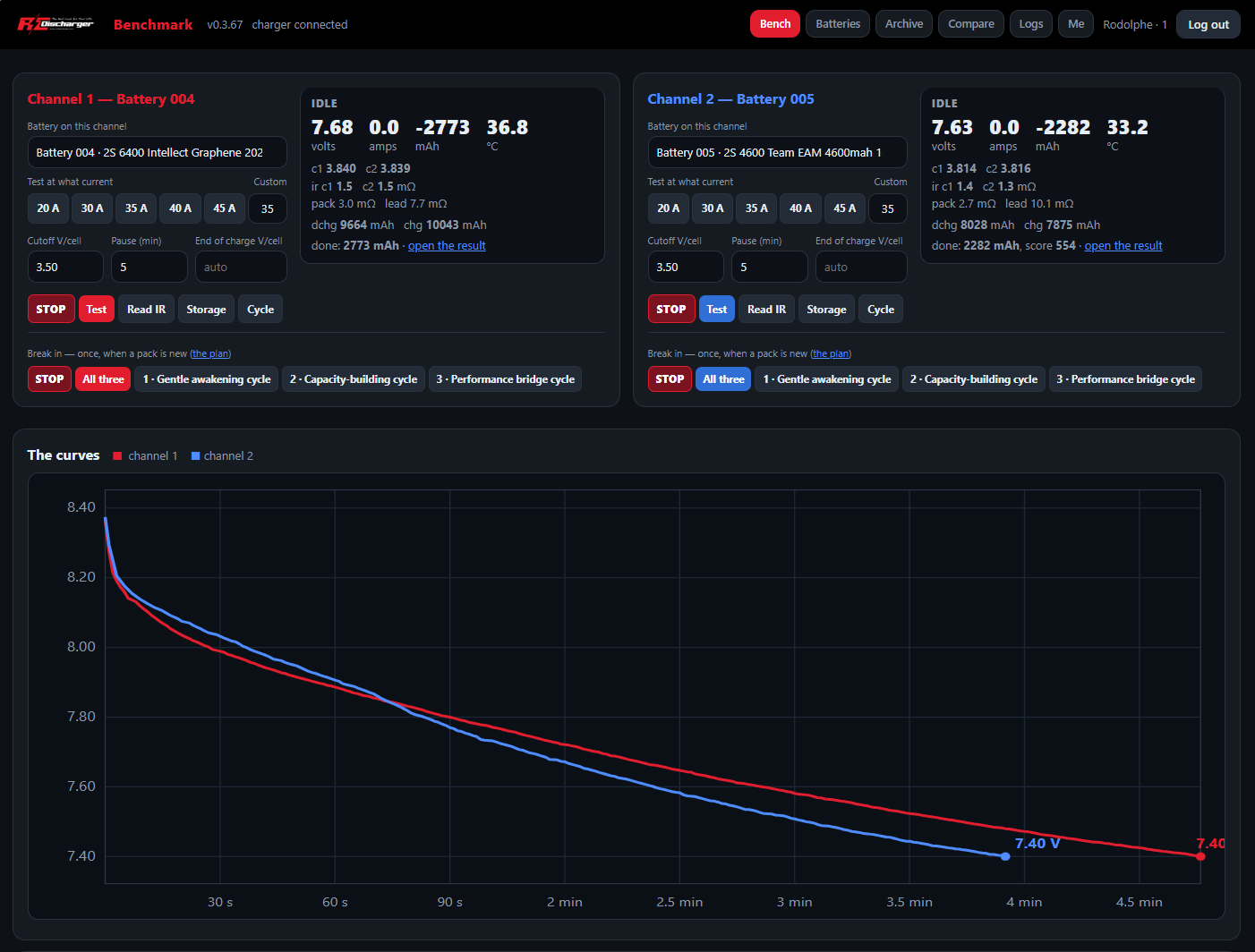
Test two LiPo batteries under the same conditions. Review how each pack performs during the run and use real measurements to compare them.
Follow live battery data
Monitor voltage and discharge curves, capacity and temperature as the test runs. See how each battery behaves throughout the discharge.
Compare up to four batteries
Select up to four saved batteries and review their curves and detailed results together. Compare packs and track performance changes over time.
Keep every test organized
Automatically archive completed tests with detailed result sheets. Use saved battery profiles, unique battery numbers and test history to keep track of your packs.
Run cycling and break-in programs
Choose pre-programmed cycling and break-in routines. Run an individual break-in step or select the complete sequence to run all steps automatically.
Calculate current from saved capacity
Save the battery capacity once and select the pack on the bench. Benchmark calculates C-rate-based program currents from that capacity, reducing repeated manual calculations.
Build your Battery Benchmark setup
Start with the required temperature sensor, choose a wired or wireless connection, then add a printer or a stand with tablet holder.
iCharger temperature sensor
The app requires live battery temperature data for every test. It cannot be used without the RC Discharger temperature sensor.
View the required temperature sensor →USB Benchmark Adapter
Connect your compatible Android tablet to the iCharger by USB. Use the correct charger data cable, sold separately. Check tablet compatibility below.
View the USB Benchmark Adapter →Direct USB connection
Connect a compatible USB-C iCharger to your Windows PC with the USB-A to USB-C data cable. No USB Benchmark Adapter is needed.
View the USB-A to USB-C cable →RCD Link wireless connection
Connect your iCharger wirelessly to your Android tablet, iPad or Windows computer for a more flexible Battery Benchmark setup.
View RCD Link →Battery Benchmark Printer
Print your Battery Benchmark results to keep a paper record with your packs and compare tests at the track.
View the Benchmark Printer →Stand with tablet holder
Keep your tablet easy to read while testing. Explore the stand with tablet holder and the full range of Battery Benchmark accessories.
Explore Benchmark accessories →Proven compatible — running today
These exact models have completed live testing with the RC Discharger Battery Benchmark system.
| Tablet | Bench notes |
|---|---|
| Galaxy Tab S10 FE (SM-X520) | Main bench tablet — proven through complete runs on both channels. |
| Galaxy Tab A7 Lite (SM-T220) | Proven live at −20 A with cell voltages and IR. Its 8.7-inch screen is compact, but the USB connection is solid. |
Buying today — best fit first
Approximate prices are provided only as a buying guide and can change.
| Tablet | Approx. price | Why it fits |
|---|---|---|
| Galaxy Tab A11+ | $200–300 | The budget bench: current Android and years of updates ahead. The natural second tablet. |
| Galaxy Tab S10 Lite | About $400 | Mid-tier choice with a larger screen, from the same family as the proven Galaxy Tab S10 FE. |
| Galaxy Tab S11 / S11 Ultra | $675–900+ | Flagship performance. More power than the bench requires, but an excellent premium option. |
| Galaxy Tab Active5 | About $550 | The pit-lane choice: rugged construction, glove mode and a swappable battery. |
Known bad — with the reason
- Galaxy Tab A8 (SM-X200): The tested unit showed a documented failing USB-C port daughterboard, matching the connect/disconnect loop captured in its kernel log. The port is repairable with a replacement daughterboard (approximately $15) and an iFixit repair guide; otherwise, skip this model.
- Amazon Fire tablets: Fire OS is not supported for the RC Discharger Battery Benchmark Android app.
- Older or low-memory tablets: Avoid Android 12 or older and devices with less than 4 GB of RAM.
Before buying an Android tablet: check this list, choose the USB Benchmark Adapter for a wired connection or RCD Link for wireless, and connect the mandatory iCharger temperature sensor.